AI Jargon Decoded: What All Those Tech Terms Actually Mean for Your Business
So grab yourself a coffee, or a wine, depending on the time of the day.... this is one of my longer blog posts!
Let me set the scene.
You're in a conversation. A software demo, a conference session, a webinar, or a group chat with colleagues. Someone starts throwing around terms like "agentic AI," "MCP," "RAG," and "non-deterministic outputs." Everyone around you is nodding. You nod too. Vigorously. You're an excellent nodder.
And then you go home and quietly Google EVERY.SINGLE.WORD!.
I have been that person. Correction.... I AM THAT PERSON. Recently, and repeatedly. I am on what I'll generously call a steep
learning curve with all things AI, and I've done my fair share of post-meeting Googling, and diving down Claude and ChatGPT rabbit holes,
and asking questions of those far more technically superior than I am, that if I am honest, I was mildly highly
embarrassed to ask!
The good news? I've done a lot of the research so you don't have to start from scratch. And I can tell you with confidence: this stuff is genuinely not as complicated as it sounds once someone explains it without assuming you already know.
So that's what this is. A plain-English glossary of 15 terms you're likely to be hearing right now. Whether you're a business owner trying to figure out which AI tools are worth your time and money, or a bookkeeper or accountant watching the industry shift underneath your feet and wondering what it all actually means for how you work.
Each term gets a proper definition, a real-world analogy, and a "why it matters to you" section. No nodding required.... hopefully. And yes... full disclosure - I have helped AI curate and define these terms..... and why wouldn't I.... it understands them far more deeply (and eloquently) than I do.
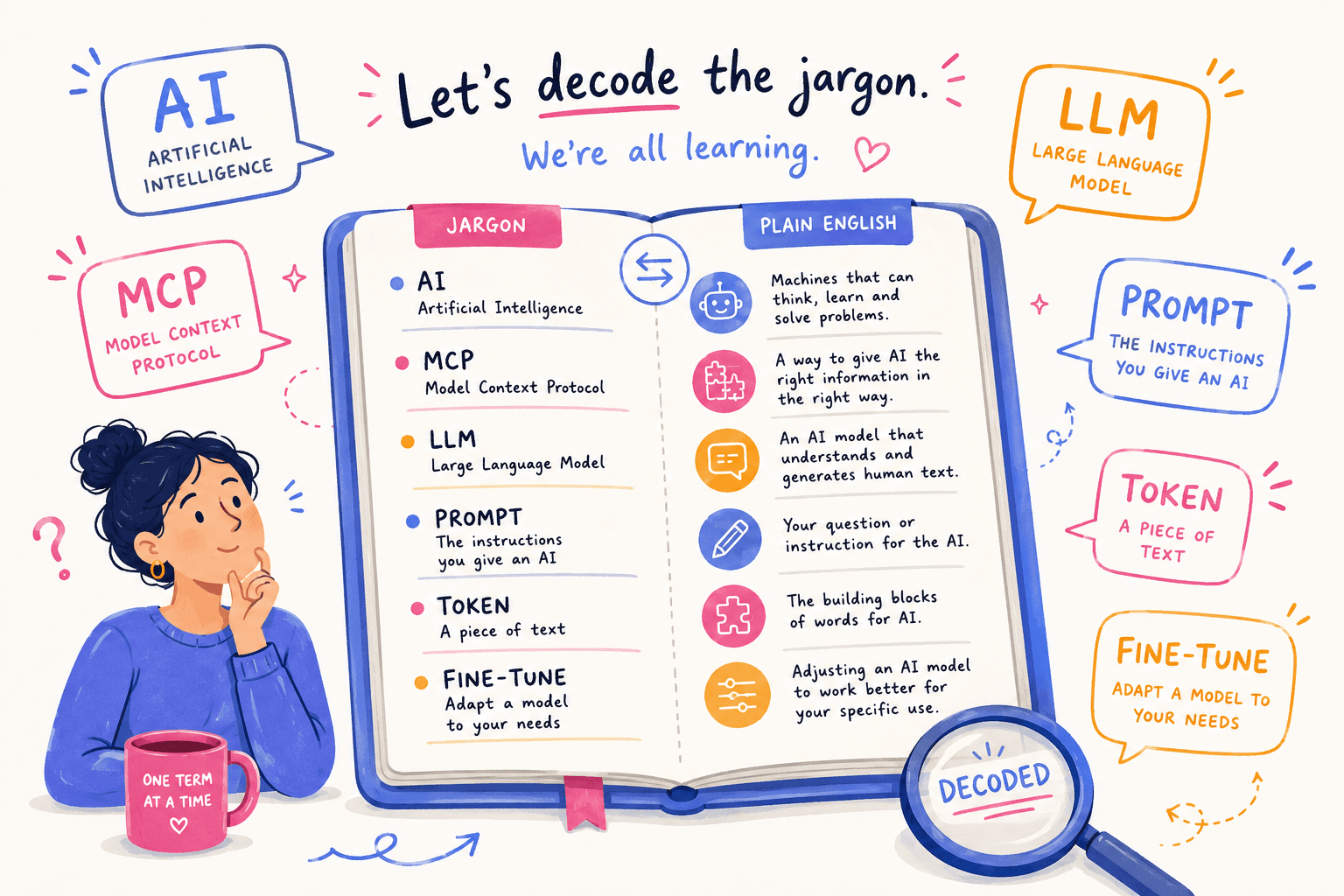
1. AI (Artificial Intelligence)
What it means technically: A broad field of computer science focused on building systems that can perform tasks that would normally require human intelligence - reasoning, learning, understanding language, making decisions.
The analogy: AI is less like the terrifying robots from sci-fi films (we're not there yet, please hold) and more like a very well-read assistant who has absorbed an enormous amount of information and can respond intelligently to questions. But.... they still need clear direction from you to do the job well. Think less Terminator, more very keen graduate.
Why it matters to you: "AI" is the umbrella term. Everything else in this glossary sits underneath it. When someone says "we're using AI in our business," that could mean a huge range of things. Anything from a simple chatbot to a fully automated workflow. Always ask what kind, because "we use AI" is doing a lot of heavy lifting as a phrase right now.
2. LLM (Large Language Model)
What it means technically: A type of AI system trained on massive amounts of text data that can understand and generate human language. ChatGPT, Claude, Gemini, and Copilot are all built on LLMs.
The analogy: Imagine hiring a staff member who has read millions of books, articles, legal documents, financial reports, and social media posts. They haven't experienced any of it, all they have done is read it. An LLM is like that staff member's brain - extraordinarily well-read, very good at language, but working entirely from what it's absorbed rather than from lived experience. Great at writing. Occasionally very confident about things that turn out to be wrong. (and we've all worked with someone like this.)
Why it matters to you: When you use tools like ChatGPT or Claude to write content, summarise documents, or answer questions, you're using an LLM. Understanding this helps you understand why they're great with language but can sometimes get facts wrong. They're pattern-matching from training data, not looking things up in real time (unless they've been given additional tools to do so, which brings us to several terms further down this list).
3. Model
What it means technically: The specific AI system you're using within a platform. Different models have different capabilities, training data, and performance levels. GPT-4o, Claude Sonnet, Gemini 1.5 Pro. These are all different models.
The analogy: Think of a "model" like a car engine. The car (the app or platform) is what you see and interact with. The model is what's under the bonnet, doing the actual work. A Corolla and a Ferrari are both cars, but they perform very differently. Also one of them costs significantly more, which brings us to the next relevant point.
Why it matters to you: If you're comparing AI tools or choosing between subscription tiers, you'll often be choosing between models. A more capable model generally costs more, but it also handles more complex tasks better. Knowing which model a tool is running on helps you understand what to expect from it, and whether the price difference is actually worth it for what you need.
4. Prompt
What it means technically: The instruction or input you give to an AI system. It's how you tell the AI what you want it to do.
The analogy: A prompt is like a brief to a contractor. A vague brief gets a generic result. A clear, detailed brief, one explaining the context, the audience, the format, and the outcome you want will get a much better result. The AI isn't being difficult when it gives you something unhelpful - it's working with exactly what you gave it. (I say this having spent an embarrassing amount of time frustrated at AI before I realised the issue was my instructions, not the tool.)
Why it matters to you: The quality of what you get out of an AI tool is directly tied to the quality of what you put in. "Write me a marketing email" will get you something average. "Write me a 200-word email to a small business owner who hasn't responded to our quote, keeping the tone warm and not pushy, with a clear call to action" will get you something usable. Learning to write better prompts is genuinely one of the highest-return skills available right now. AND..... it doesn't require any technical knowledge, just clarity.
5. API (Application Programming Interface)
What it means technically: A set of rules and protocols that allows different software systems to communicate with each other. It's how apps and platforms share data and functionality.
The analogy: An API is like a waiter in a restaurant. You (the customer) want something from the kitchen (another system). You don't go into the kitchen yourself. You tell the waiter what you want, the waiter goes to the kitchen, and the kitchen sends back exactly what was ordered. Same request, same response, every time. It's efficient and reliable, but it's also fixed. The waiter can only bring you what's on the menu, and there's no improvising.
Why it matters to you: When your payroll software "talks to" your accounting platform, or when your CRM sends data to your email marketing tool, there's almost certainly an API doing that work quietly in the background. In the AI context, APIs also let developers connect AI capabilities into their own products and workflows — which is why you'll hear this term a lot as more tools start adding AI features.
6. MCP (Model Context Protocol)
What it means technically: An open standard that allows AI models to connect directly to tools, data sources, and other systems in a structured, two-way way. Rather than just answering questions, an AI with MCP can actively access information, take actions, and work across multiple systems simultaneously.
The analogy: Remember the restaurant analogy for API? MCP blows up the whole setup. Instead of a waiter going back and forth with fixed orders from a fixed menu, now the AI has full access to the kitchen, the pantry, every recipe book on the shelf, every ingredient in the fridge, and the ability to check what's been ordered before. You don't need to order from the menu anymore. You describe what you want, and the AI figures out how to build it from everything available. It can cross-reference, adapt, and create something tailored rather than just retrieving something pre-set. This is the analogy that made MCP click for me, and I haven't found a better one yet.
Why it matters to you: MCP is why AI tools are starting to feel genuinely useful for complex, multi-step work rather than just answering simple questions. It's the technology behind AI tools that can check your calendar, pull a client record, draft a response, and log a follow-up task — all from a single instruction. If you're hearing that AI can now "do things" rather than just "answer things," MCP is a big part of why.
7. Agent / Agentic AI
What it means technically: An AI system that can take a sequence of actions to complete a goal, rather than just responding to a single question. An agent can plan, use tools, make decisions along the way, and loop back to check its own work.
The analogy: A standard AI interaction is like asking someone a question and getting an answer. An AI agent is more like delegating an entire project. You say "research our three main competitors and put together a comparison summary," and the agent goes away, searches the web, reads the pages, compiles the findings, formats the summary, and delivers it, all without you managing each step. Whether it makes a coffee on the way is still being worked on (the husband model has not yet been superseded.... yet....).
Why it matters to you: Agentic AI is where a lot of the real productivity gains are going to come from, for business owners and for practitioners in the bookkeeping and accounting space. Rather than using AI to help you do a task, agentic AI can do the task while you focus elsewhere. We're still early days, and it's important to review what agents produce rather than treating their output as gospel, but the direction this is heading is genuinely significant.
8. RAG (Retrieval-Augmented Generation)
What it means technically: A technique where an AI is connected to a specific knowledge base or document library, so it can retrieve relevant information before generating its response. Instead of relying only on what it was trained on, it can look things up from a curated source in real time.
The analogy: Picture the difference between asking a new employee a question about company policy when they've only done generic onboarding training, versus asking them the same question when they have your actual policy manual open in front of them. RAG gives the AI your specific documents to draw from, rather than general knowledge that may or may not be relevant or accurate.
Why it matters to you: If you've ever seen an AI tool that can answer questions specifically about your business, things like your procedures, your products, your client FAQs, then it's likely using RAG. It's also why AI answers based on general training can be outdated or off-target, while a RAG-enabled tool gives you something specific and current. For bookkeepers and accountants, this is the technology that makes AI tools "ATO-aware" or "industry-specific" rather than just generically smart.
9. Context Window
What it means technically: The total amount of text, both input plus output, that an AI can "hold in mind" during a single conversation or task. Once you exceed it, the AI starts to lose track of earlier parts of the conversation.
The analogy: Imagine you're briefing a consultant in a meeting room. Everything said in that room, they can reference and respond to. But if the meeting runs for six hours without notes, they might start forgetting what was discussed at 9am by the time you get to 3pm. The context window is essentially the size of that meeting room's whiteboard. It's how much can be held and actively referenced at once.
Why it matters to you: If you're using AI to work through long documents or extended conversations and the responses start to feel disconnected, repetitive, or like the AI has forgotten what you told it ten minutes ago — it may have run out of context window. Larger context windows (some models now handle hundreds of thousands of words) are a genuine practical improvement for things like contract review, long-form report analysis, or working through a client's messy records.
10. Token
What it means technically: The unit AI models use to process text. Roughly speaking, one token equals about three to four characters, or about three-quarters of a word. AI pricing and limits are almost always expressed in tokens rather than words or pages.
The analogy: Think of tokens like postage. The heavier and longer the letter, the more it costs to send. AI tools meter their usage by how much text flows through them. This includes your instructions, the documents you share, and the responses generated all consume tokens. The AI equivalent of "I accidentally sent a parcel-sized letter at letter postage rates" is uploading a 60-page document and wondering why you've burned through your monthly allocation.
Why it matters to you: When you're evaluating AI tools and comparing costs, understanding tokens helps you make sense of the pricing. A task involving a long document will use far more tokens than a short query. Some tools give you a set number of tokens per month and knowing roughly what you're using helps you choose the right plan and avoid nasty surprises.
11. Fine-tuning
What it means technically: The process of taking an existing AI model and training it further on a specific dataset so it performs better for a particular purpose, industry, or style. A fine-tuned model has been shaped beyond its base version to behave differently in targeted ways.
The analogy: Think of a fine-tuned model like an experienced hire from another industry who then completes a targeted upskilling program with your firm. They arrived with strong general capability, and the training shaped their knowledge and instincts to fit your specific context. So now, they're not just smart in general, they're smart in the ways that actually matter for the job.
Why it matters to you: Fine-tuning is why some AI tools are noticeably better for specific industries. An AI tool built for legal professionals has often been fine-tuned on legal text. One built for accounting and bookkeeping has been trained on relevant content for that space. As AI matures, fine-tuned industry-specific models are likely to become the standard for professional use cases, which is worth knowing when you're evaluating tools that claim to be "built for" your industry.
12. Automation vs AI
What it means technically: These are two different things that get used interchangeably constantly, and they're not the same. Automation follows fixed rules - quite simply, if X happens, do Y. It doesn't make decisions or handle variation; it just executes. AI can handle ambiguity, interpret context, and respond differently depending on what it sees.
The analogy: Automation is the dishwasher. It runs the same cycle every time regardless of what's in it. AI is more like a skilled kitchen hand who looks at what's dirty, decides the best approach for each item, and adjusts accordingly. Both are useful. One of them sulks if you put in a pot it wasn't designed for.
Why it matters to you: When someone tells you they're going to "automate" something with AI, it's worth asking which they actually mean. True automation (rules-based) is often faster, cheaper, and more reliable for predictable, repetitive tasks. AI is more valuable when the task involves judgement, variation, or natural language. The best solutions often use both, and knowing the difference helps you have a more informed conversation about what's actually being built.
13. Deterministic vs Non-Deterministic
What it means technically: A deterministic system always produces the same output from the same input, every single time. A non-deterministic system can produce different outputs from the same input — the result varies based on probability, context, or internal randomness. Traditional software and rule-based automation are deterministic. Most AI models are non-deterministic.
The analogy: A calculator is deterministic. Type in 4 + 4 and you will get 8. Every time, forever, no matter what mood the calculator is in. An AI model is more like asking a knowledgeable colleague the same question on different days. The answer will be broadly consistent, but the wording, the emphasis, and occasionally even the specific details might shift. It's not broken. It's just how it works. (This was genuinely one of those "ohhhh" moments for me when I finally understood it.)
Why it matters to you: This is one of the most practically important concepts for anyone putting AI into a business process. If you need the same input to always produce the same output, for compliance documentation, financial calculations, or anything that needs to be auditable, you either need a deterministic system, or you need to build very tight constraints around how the AI is used. For bookkeepers and accountants especially, this distinction matters a lot when evaluating where AI can and can't be trusted to work unsupervised.
14. Integration
What it means technically: In the AI context, integration refers to connecting an AI tool to the other software and data sources in your business so it can work across them rather than in isolation.
The analogy: Integration is the difference between hiring a contractor who sits in a separate office with no access to your systems, versus one who's connected to your CRM, your calendar, your email, and your project management tool. The capability is the same. The usefulness is completely different.
Why it matters to you: An AI tool that isn't integrated into your existing systems can still be useful, but it's limited to what you manually bring to it. The real business value shows up when AI is integrated. When it can pull live data, update records, trigger actions, and work within your actual environment. This is where MCP (see term 6) is becoming increasingly important, and it's why "does this integrate with my existing tools?" is one of the most important questions to ask when evaluating anything new.
15. Workflow
What it means technically: In the AI context, a workflow is a structured sequence of automated or semi-automated steps that an AI system executes to complete a task. It's different from a single AI interaction - it's a series of connected actions with logic between them.
The analogy: A single AI interaction is like making one phone call. An AI workflow is like a project plan with tasks assigned, dependencies mapped, and each step automatically triggering the next, all without you having to manually push each one along.
Why it matters to you: As AI tools become more capable, "AI workflows" are replacing what used to require either significant manual effort or expensive custom software. A workflow might automatically pull a new client inquiry from your email, create a record in your practice management system, send an acknowledgment, schedule a follow-up reminder, and flag anything urgent — all without you touching it. Understanding that this is a workflow (not magic, and not fully autonomous either) helps you think clearly about where the real leverage is in your business.
Putting It Together
Here's my honest take after spending a fair amount of time on this steep learning curve: the terminology is genuinely less intimidating once you get past the acronyms. Most of these concepts make intuitive sense with the right analogy. The hard part isn't understanding them, but rather finding explanations written for people who aren't already deep in the tech world.
That's what I was trying to do here.
You don't need to become a technologist to navigate this well. But understanding the language means you can have smarter conversations, make better buying decisions, ask better questions in demos, and stop nodding vigorously while internally panicking.
If you'd like to talk through how any of these concepts apply specifically to your business or practice, I'd genuinely love to help — this is exactly the kind of conversation I've been having a lot lately. Reach out at contact@cscottbusiness.com.au or call us on 07 3879 2090.
And if there are terms I've missed that have been doing your head in — drop them in the comments. I'll either explain them or admit I also had to Google them. Both outcomes are equally likely.
Cass Scott is the founder of Cass Scott Business Services, a Queensland-based business services firm supporting SMEs, bookkeepers, and accounting professionals. Visit www.cscottbusiness.com.au for more resources.


Leave a Comment